The AI Christmas photo prompts below turn an ordinary photo into a holiday scene, a card front or a vintage family snapshot, and each one tells the model what to keep before it adds any tinsel. They are written for ChatGPT and Gemini, where you upload a photo and describe the change in plain sentences.
Words in square brackets are placeholders: swap [family name] or [color] for your own. After the list you find card formats and quick fixes for faces, hands and pet markings.
The short answer
Upload a sharp photo to ChatGPT or Gemini, paste one prompt and replace the words in brackets. If a face changes, send “Keep every face exactly as in my photo” as a follow-up in the same chat, and ask for one fix at a time.
What is the ChatGPT Christmas photo prompt everyone shares?
There is no single secret ChatGPT Christmas photo prompt behind the pictures shared every December. The AI Christmas photo trend shifts a little each year, but the results that look real follow a pattern: protect the people first, describe one clear scene, then name the light. Christmas light comes from real objects – tree lights, a fireplace, a shop window at dusk – and naming the source gives the model a reason for every warm glow.
A prompt that asks for “a magical Christmas photo” does the opposite: glitter everywhere, plastic skin and a tree that looks pasted in. Pick one setting, say where the light comes from and name the format, such as 4:5 for Instagram or 5:7 for a card.
How to use a Gemini AI Christmas photo prompt
The steps are nearly the same in Gemini and ChatGPT.
- Start a new chat so older requests don’t leak into the picture.
- Upload one photo. For a family picture, use a group shot where every face is visible and in focus.
- Paste a prompt from this page and replace each word in square brackets.
- Check the result at full size: fingers around mugs, and whether each person still looks like themselves.
- Send small corrections in the same chat, such as “same picture, but less snow in the hair”.
Which photo works for AI family Christmas pictures?
The photo you start with decides more than the prompt does. Window daylight, faces turned toward the camera and nothing covering eyes or mouths give the model enough detail to keep everyone recognizable. Small faces at the back of a group photo have fewer pixels to protect, so crop closer or use a second photo of those people. For pets, shoot at their eye level; for babies, a calm, sharp close-up beats a blurry action shot.
13 prompts to copy and adapt
Family by the Christmas tree
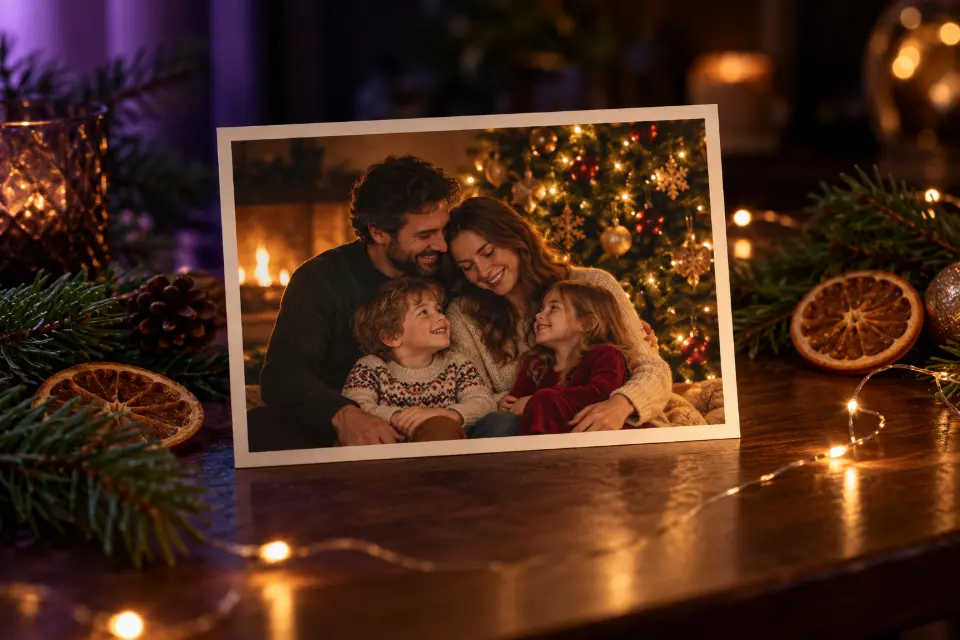
Keep every face, hairstyle and expression from my photo exactly the same, and keep the number of people unchanged. Place the family in a cozy living room beside a tall decorated Christmas tree with warm white lights, a fire glowing in a brick fireplace and wrapped presents on a wool rug. Everyone wears matching cream knit sweaters. Soft warm light from the tree and fire, natural skin texture, 4:5 format.Fixing the number of people stops the model from adding a stranger at the edge. Swap the sweater color to suit your family.
Couple at a Christmas market
Use the two people from my photo and keep both faces exactly as they are. Put them at an outdoor Christmas market at night, standing close at a wooden stall and holding paper cups of hot cocoa with steam rising. Strings of warm bulbs blur into soft bokeh behind them, light snow is falling and their coats are dusted with flakes. 50mm lens look, shallow depth of field, 4:5 format.The cups give hands something natural to do, which avoids awkward hands. Replace the market with an ice rink or a lit-up street if that fits you better.
Your pet by the presents
Keep my pet’s exact fur color, markings, eye color and face. Show it sitting on a plaid blanket in front of a decorated Christmas tree, wearing a red knit scarf, with a few wrapped presents beside it and one small present between its paws. Camera at the pet’s eye level, warm tree lights in soft bokeh, sharp focus on the eyes, natural fur texture, 4:5 format.Eye-level framing is what makes a pet portrait feel personal. For a cat, swap the scarf for a thin velvet collar, which sits better on a small head.
Kids decorating gingerbread cookies
Keep the children’s faces, hair and expressions exactly as in my photo. Show them at a kitchen table decorating gingerbread cookies with white icing and sprinkles, a little flour on their sleeves and a tray of star-shaped cookies in front of them. Soft morning light from a window on the left, a string of lights on the shelf, candid family photo, 4:5 format.Pick an activity your kids really enjoy and the picture feels like a memory, not a costume. Share photos of children only with people you trust.
1960s Christmas morning snapshot
Keep everyone’s faces and poses from my photo. Restyle it as a 1960s Christmas morning snapshot: a silver tinsel tree with large colored bulbs, a wood-paneled living room, opened presents on a shag carpet, clothes that fit the era. Saturated slide-film colors, slightly faded highlights, soft focus at the edges, white border with rounded corners like an old print.Objects from the decade do more than the word “vintage”. For the 1980s, ask for a fake fir tree and on-camera flash.
Lantern portrait in a snowy forest
Keep my face, hairstyle and expression exactly the same. Place me in a snowy pine forest at blue hour, holding an old brass lantern with a warm flame, wearing a long wool coat and a knitted scarf in [color]. Snow on the branches, my breath visible in the cold air, the lantern lighting my face from below and one side, deep blue background, 85mm portrait look, 4:5 format.Cold blue surroundings against one warm light carry the whole picture. It suits a December profile photo or a solo card for friends.
Watercolor Christmas card front
Design the front of a vertical Christmas card. A watercolor illustration of a small snowy village at dusk, warm light in the windows, a single decorated tree in the square, soft pine green and deep red on cream paper texture. Leave the top third calm for text. Write in elegant hand-lettered script: “Merry Christmas from the [family name] family”. 5:7 format.Quotation marks help the model copy the greeting letter by letter. Check the spelling, or drop the text line and add the greeting in a card app.
Matching pajamas on Christmas morning
Keep every face and expression from my photo the same. Show us on a sofa on Christmas morning in matching red and white striped pajamas, laughing, surrounded by torn wrapping paper and ribbons, mugs on the coffee table and the tree lights still on. Soft daylight from a large window, slightly high camera angle, candid snapshot feel, 4:5 format.Torn paper and a high angle make it look like a phone snapshot. Change the stripes to plaid if you like.
Velvet blazer portrait by the fire
Keep my face, beard, hairstyle and expression exactly the same. Turn the photo into a moody holiday portrait: I wear a dark green velvet blazer over a black turtleneck and sit in a leather armchair beside a fireplace, a small decorated tree out of focus behind me. Low-key lighting, warm firelight on one side of my face, deep shadows, 85mm lens look, 4:5 format.Low-key firelight keeps it festive without looking like a costume. Remove “beard” if you are clean-shaven, or try a cable-knit sweater for a softer look.
Ugly sweater party flash photo
Keep everyone’s faces and expressions from my photo. Dress us in loud, funny Christmas sweaters with knitted reindeer, snowflakes and pom-poms, each sweater different. We stand shoulder to shoulder at a house party, laughing, with paper chains and a slightly crooked tree behind us. Direct on-camera flash, slightly overexposed faces, dark background, everyday party snapshot look.The flash look hides small AI flaws and fits the joke. Name a color per person if someone in the group has a favorite.
Your family inside a snow globe
Create a glass snow globe on a wooden windowsill, and inside it a tiny version of the people from my photo, keeping their faces recognizable. They stand in front of a miniature snowy cottage with a lit doorway, small fir trees around them, snowflakes swirling in the water. Behind the globe, a blurred evening garden with fairy lights. Macro product photo, sharp glass reflections, 1:1 format.This miniature look keeps showing up in viral AI Christmas photos. The faces end up tiny, so pick a photo where everyone looks straight at the camera.
Baby’s first Christmas
Keep the baby’s face, features and expression exactly as in my photo, and keep the parent’s face unchanged. The baby, in a soft red knitted hat and a cream romper, rests in the parent’s arms beside a softly lit Christmas tree. Warm lights in gentle bokeh, soft window light from the side, natural skin with no smoothing, calm and quiet mood, 4:5 format.A baby in a parent’s arms looks natural and safe; skip ideas that place babies among ornaments or candles. Keep the untouched original next to the edit.
Holiday product photo for your shop
Use the product from my photo and keep its shape, label, colors and size exactly the same. Place it on a dark wooden table with fresh pine branches, a few dried orange slices, cinnamon sticks and a small box tied with red ribbon. Warm side light from the left, a soft natural shadow, out-of-focus tree lights behind. Premium holiday shop photo, sharp label, 1:1 format.Pine and orange slices say “holiday sale” without hiding the product. For plain-background marketplaces, ask for white with one pine sprig.
Turning an AI Christmas photo into a printed card
Most printed cards in the US are 5x7 inches, so ask for 5:7 vertical or 7:5 horizontal and leave a quiet area for the greeting. If the model writes the text, keep it short, put it in quotation marks and check every letter: image models still swap letters in longer words, and “Christmas” is long enough to suffer.
For a cleaner result, generate the picture without text and add the greeting in a card app. Zoom in before printing: a melted ornament that hides on a phone is obvious on paper.
Fixing an AI Christmas photo prompt that misses
When a result is almost right, fix one thing at a time in the same chat.
- Someone looks like a stranger: send “Keep every face exactly as in my original photo”, and upload a sharper picture if it keeps happening.
- Everything glows: replace words like magical or sparkling with a real light source, such as tree lights or a fireplace.
- Hands look odd: give them a task, like holding a mug, a present or each other’s hand.
- Your dog has new markings: list them, for example “white patch over the left eye”.
- The scene looks pasted in: ask it to match the light on the people to the room.
Can you share AI family Christmas pictures?
Ask the people in the photo before you share an edit, and think twice before posting children’s faces publicly. If a picture could pass for a real gathering that never happened, say it was made with AI. Images made with Gemini can carry Google’s invisible SynthID watermark, and both apps refuse some requests, such as edits of public figures.
Which Christmas prompt fits your plan?
| Your plan | Start with | Format |
|---|---|---|
| Photo card for relatives | Family by the Christmas tree | 5:7 or 4:5 |
| Instagram post with your partner | Couple at a Christmas market | 4:5 |
| December profile picture | Lantern portrait in a snowy forest | 4:5 or 1:1 |
| A joke for the group chat | Ugly sweater party flash photo | 4:5 |
| Listing for a holiday sale | Holiday product photo for your shop | 1:1 |
Questions and answers
How do you do the AI Christmas photo trend?
Upload a real photo to ChatGPT or Gemini and ask for one holiday scene that keeps your face. The snow globe and 1960s prompts above follow the viral styles.
Can I make an AI Christmas photo for free?
These AI prompts for Christmas photos are free to copy. Making the images depends on the current plans and daily limits of ChatGPT or Gemini.
Can I use a Gemini AI prompt for a Christmas family photo with many people?
Yes, but faces get harder to keep with every extra person. Use a sharp group photo, say that the number of people stays the same, and fix one person at a time.
How do I write an AI prompt for a dog Christmas photo?
Describe your dog’s fur color, markings and eye color in the keep sentence, frame the shot at its eye level and add one simple prop, like a scarf.
What size should an AI Christmas card be?
Ask for 5:7 for a standard card, 4:5 for social media and 1:1 for a square card, and leave space for the greeting.
Why does my AI Christmas photo look fake?
Usually the prompt asks for sparkle without a real light source. Name where the light comes from, ask for natural skin texture and stick to one scene.