
The short answer
Select the country and review buying costs one by one. Separate cash needed upfront from recurring housing costs and the modelled interest total. Keep the original inputs beside any printed comparison so an assumed fee remains identifiable.
Open the free toolSee the steps in action
A short recording of our tool, without sound. Turn on captions for the steps in your language. The written instructions below cover the same process.
Open or download the video · 0.5 MB · 24 s
Each step is also explained in writing.
- Choose the country, then enter the purchase price and your savings.
- Open “Buying costs”: each item has its usual rate, and you can change it.
- The payment updates at once – for the US with tax, insurance and PMI.
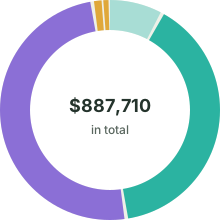
- Under “Charts”, “Total cost” shows the loan, the interest and the buying costs.
- The schedule below lists every year; download it as CSV.
What you pay before you move in
The worked scenario starts with a $425,000 price and $85,000 in savings. Its closing-cost input is 3 %, producing $12,750 in the model. This percentage is illustrative, without a claim about the charge for a particular transaction. Use your own written cost figures when preparing another case.
After the example’s closing costs are taken from savings, the remainder reduces the price financed. The resulting model loan is $352,750. Keep the cost payment and down payment separate so the same savings are not counted twice.
| Item | Amount |
|---|---|
| Purchase price | $425,000 |
| Closing costs (3 %) | $12,750 |
| Paid from savings | $85,000 |
| Mortgage | $352,750 |
The monthly bill is more than the mortgage
Within this model, principal and interest are $2,206.47 monthly. The entered tax and home-insurance assumptions add $389.58 and $133.33. These are model components, not an assertion that every lender bundles them in the same way.
The example’s PMI settings add $146.98 to the initial modelled bill of $2,876.36 and stop under the model’s schedule. Actual cancellation or termination depends on applicable conditions and the loan. Use the linked CFPB information and ask the servicer for the terms of your own agreement.
Thirty years of interest
Over the full term the interest adds up to $441,582 – more than the loan itself. In the first year, only $4,018 of the $26,478 you pay reduces the loan.
Price, closing costs, interest and PMI together: $887,710, before tax and insurance. That is the number to keep in mind when you compare homes and loans.
Work it out for your own home
Pick the country
Open Mortgage Studio and choose “United States ($)” under “Country”. The closing costs, property tax, insurance and PMI fields appear.
Enter price and savings
Type the “Purchase price” and “Your savings (equity)”. Open “Buying costs” to check the 3 % estimate against your Loan Estimate.
Add the loan
Enter the rate from your offer and the “Term”. Fill in property tax, home insurance and HOA dues if you have them.
Read the total
Under “Charts”, choose “Total cost”. The “Amortization schedule” lists every year; “Download CSV” takes it to a spreadsheet.
Where the total can shrink
Make a list of costs with their source
Prepare a row for each cost and note where its amount came from. A written lender estimate, an insurer’s quote and a hypothetical allowance are not equally certain. Mark them differently so a reader does not mistake a placeholder for a confirmed charge. The example’s percentages explain its arithmetic, without establishing a current price for a real transaction. Do not replace an unexplained quote with the tool’s starting value merely because the latter looks simpler. Keep the discrepancy as a question. The CFPB’s Loan Estimate explainer describes the separation between loan costs, other charges and the cash needed to close; it is linked with its checked date.
Separate cash at purchase from recurring costs
Build two views: what must be paid around the purchase and what continues afterwards. A monthly average of an annual bill can help a household calculation, but it does not change the actual payment date on that bill. Keep the date where it matters. Likewise, money spent on buying costs cannot simultaneously reduce the loan amount. Use an illustrative copy to explore the controls, then enter your documented amounts. The calculator does not verify a tax assessment, insurance policy or property condition. Costs outside its fields remain part of the real decision even when they do not appear in a modelled total.
Read the time horizon behind a total
A thirty-year interest total describes a long sequence under the chosen assumptions. If the rate is fixed for a shorter period, a continuation beyond it is an illustration using the model’s rate. It does not promise a refinancing offer or measure future taxes. State the horizon when comparing results. A lower monthly amount over a different duration is not the same question as a lower total over identical terms. Inspect the balance at a relevant boundary and record the assumptions beside it. Avoid judging two offers by one attractive headline when their costs, periods and remaining debts describe different scenarios.
Keep the comparison auditable for your own use
Save the input list and the original CSV before changing a scenario. Give alternatives descriptive names, such as different documented fee or another illustrative term, rather than better and worse. Change one input at a time and note the effect you were examining. This does not rank the offers for you. Ask the relevant lender or authority to explain a disputed charge and use the applicable official material for your country. The guide is a worked planning example without financial or tax advice. A printed total helps discussion only when another person can see what it contains and what was deliberately left outside it.
Keep a readable comparison record
Add an inclusion checklist beside any total you send to another reader. Mark whether it contains buying costs, repayment, interest and the particular insurance inputs. Note expenses excluded from the model separately. Two totals cannot be compared fairly simply because both have a currency sign and many digits. If one contains an ongoing charge and the other leaves it out, resolve that difference before discussing which scenario costs less. The checklist makes the conversation about defined components instead of about a headline that may conceal different time periods.
Questions you might still have
Are the example fees current prices?
No. They define the worked model. Replace them with the relevant written figures and record where each amount came from.
Is a monthly total the same as cash to close?
No. Keep upfront costs and recurring payments separate and inspect what each total actually includes.
Does every property cost appear in the model?
No. Record items outside its fields separately. A visible total is not a property inspection or an exhaustive household budget.
Can a long-term total predict future taxes?
No. It follows entered assumptions. Mark the time horizon and do not treat a constant input as a guarantee.
How do I compare different fee quotes?
Match scope and timing before comparing the number. Keep an unexplained difference as a question for the provider.
Does a printout certify an offer?
No. It records a scenario. The lender’s and authority’s documents remain necessary for the actual agreement and applicable charges.
Sources & useful details
- GOV.UK: Stamp Duty Land Tax rates for residential property; checked 2026-10-22
- CFPB: when private mortgage insurance (PMI) can be removed; checked 2026-10-22
- Grunderwerbsteuergesetz: German real estate transfer tax law (gesetze-im-internet.de); checked 2026-10-22
- BGB § 656c: estate-agent commission for flats and single-family homes; checked 2026-10-22
- BOE: Ley 5/2019 — law governing real estate credit agreements; checked 2026-10-22
- CFPB: explanation of the Loan Estimate; checked 2026-10-22
- Service Public: early repayment; verified 16-09-2026; consulted 22-10-2026
- BGB § 489; as of 2026-10-22
- Banco de España: banking customer portal; consulted 22-10-2026
- HCSF: mortgage lending conditions; consulted 22-10-2026
The screen recordings show LoschaZ tools using sample files created for these guides. They are demonstrations, not tests on every phone or promises of an identical result. Examples are not customer files.