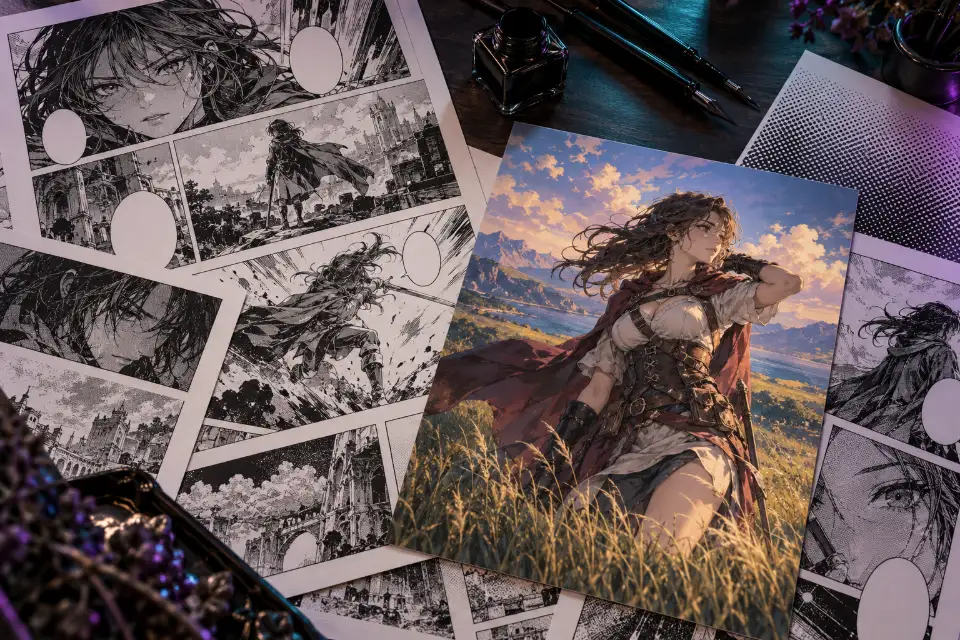
An AI manga generator gives you convincing black-and-white panels when the prompt names a manga artist’s tools: ink lines of varying weight, screentone for grays, speed lines, panel borders and white gutters. Without those words, most models drift into a colored anime illustration.
Below are prompts for single panels, a four-panel strip and full pages, plus prompts that ink, tone or color drawings you made yourself. AI is still unreliable at lettering, so most prompts leave speech balloons empty for you to fill in.
The short answer
Paste a panel prompt into ChatGPT, Gemini or Niji 7 and replace the words in brackets. Ask for empty speech balloons, then add the dialogue in an image editor so every word is spelled the way you want.
What makes an AI manga prompt look like real manga?
Manga is drawn in black ink on white paper, and its grays come from dot patterns called screentone rather than smooth shading. Say “black and white”, “ink line art” and “screentone” early in the prompt, and leave out color words unless you want a cover or a colored page.
Then borrow the vocabulary of the page. Thick outer contours with thin inner lines give the classic pen look. Speed lines show motion, radiating focus lines pull the eye to a face, and white gutters separate the panels. The table further down turns these terms into prompt wording.
Manga panel prompts: how to plan a page
A page reads like a short scene, so plan it before you prompt.
- Write one line per panel: who is in it, what happens and how close the camera is.
- Keep a character card and paste it into every panel prompt so faces and outfits match.
- Generate each panel on its own, or use the full-page prompt for a quick layout draft.
- Arrange the panels in an editor with even white gutters and one larger panel for the key moment.
- Add the dialogue last, in balloons you place yourself.
Which AI manga maker handles pages well?
ChatGPT tends to follow panel counts and layouts closely and usually handles short text well. Nano Banana in Gemini is useful for edits, such as inking your sketch or keeping one character steady across panels. Niji 7 draws strong single panels and covers from text.
Some dedicated manga apps add panel templates and lettering tools, and the prompts here work in them too. Results change with updates, so test one panel in two models before you commit to a whole chapter.
14 prompts to copy and adapt
Wide establishing panel of a hillside town
Black-and-white manga panel, wide establishing shot of a small hillside town at dawn, tiled roofs stepping down to a harbor, tangled power lines and a water tower, fine ink line art, grays made of screentone dot patterns, a crisp white sky with a few thin hatched clouds, clean rectangular panel borderOpening a chapter with a wide shot tells readers where they are. Replace the town with your story’s [setting] and keep the screentone words.
Dramatic close-up at the chessboard
Manga panel close-up of a hand placing a chess piece down hard on the board, seen from a low angle at board level, the opponent’s shocked face blurred in the background, radiating focus lines, gradient screentone, sharp ink line weight, black and white onlyA close-up of one decisive action builds tension before the reveal. Swap the chess piece for the [object] that matters in your scene.
Four-panel comedy strip
Vertical four-panel manga comic strip in black and white, equal panels with white gutters. Panel 1: a woman sets her pen on her desk. Panel 2: a cat’s paw reaches in from the edge. Panel 3: she stares at the empty desk. Panel 4: the cat sits proudly on a pile of stolen pens. Clean ink lines, simple screentone, empty speech balloons in panels 1 and 3Four-panel strips run on a setup, a turn and a punchline. Write your own four beats in the same format and keep each to a single action.
Full mystery page with five panels
Black-and-white manga page with five panels: a wide top panel of a rainy street at night, two small middle panels of a young detective’s gloved hand picking up a brass key and her eyes narrowing, a fourth panel of a door left ajar, and a large bottom panel of her stepping inside with a flashlight. Varied panel sizes, white gutters, screentone and ink hatching, empty speech balloonsSmall panels slow the reader down before the big final one. Expect to redo a panel or two, because full pages drift more than single panels.
Action panel with speed lines
Manga action panel of a goalkeeper diving full stretch to tip a soccer ball over the bar, frozen in mid-air, dense speed lines behind her, flying grass and chalk dust, low camera angle, bold ink strokes, high-contrast black and white with screentone on the jerseySpeed lines that all point one way show the direction of the dive. Swap in the [sport] your story is about.
Quiet panel with lots of white space
Black-and-white manga panel with generous white space: a young man sitting alone on the steps outside his apartment building at night, holding an unopened letter, drawn small in the lower corner, delicate thin lines, soft dotted screentone for the night sky, a few falling cherry petals, quiet and wistfulEmpty space is a storytelling tool: a small figure in a big panel feels alone. Use it after a busy page to let the reader breathe.
Comedy reaction in chibi form
Manga comedy panel: [character description] suddenly drawn in chibi form, tiny body and huge head, eyes as plain white circles, mouth wide open in shock, a small storm cloud above the head, a burst of radiating lines behind, thick outlines, black and white with one flat screentone grayThe sudden switch to chibi is manga shorthand for comic shock. Keep one detail from the normal design, such as the glasses, so readers know who it is.
Color your own manga page
Color the black-and-white manga page in my uploaded image. Keep every ink line, panel border, speech balloon and letter exactly as drawn, and do not redraw any faces. Add clean flat colors with soft cel shading: [hair color] hair, a navy jacket, warm skin tones and a pale evening sky in the outdoor panels. Leave the balloons white.Naming the colors for hair and clothes keeps them the same from panel to panel. If lines get redrawn, color one panel at a time.
Ink and tone your pencil sketch
Turn my uploaded pencil sketch into finished manga ink art. Keep the composition, poses and faces as I drew them. Trace clean ink lines with thicker outer contours and thin inner details, fill hair and shadows with screentone dot patterns, remove stray pencil marks and smudges, pure black and white.Your drawing stays yours while the model does the slow cleanup. Photograph the sketch flat and in even light for cleaner lines.
Your photo as a manga panel
Turn my uploaded photo into a black-and-white manga panel. Keep my face shape, hairstyle and glasses recognizable in a manga way. Ink line art with screentone shading, the background redrawn as a simple hatched street, a slightly low dramatic angle, one empty speech balloon in the upper corner and a panel border around the picture.Remove the glasses if you don’t wear them and name another feature of yours instead. Use photos of other people only with their permission.
Volume cover in full color
Manga volume cover illustration in full color of [character description] standing in a windy field of tall grass at sunset and looking back over the shoulder, crisp ink lines under painted color, a strong silhouette, the top third kept as plain sky for a title, subtle paper textureAvoid: text, letters, logo
Covers are the one place manga usually goes full color. Add the title and volume number yourself so the lettering stays clean.
Splash page reveal
Full-page manga splash panel: an enormous ancient tree with a whole village built into its branches, revealed as the clouds part, rope bridges and lanterns between the houses, two tiny travelers on a ridge in the foreground for scale, intricate ink detail, layered screentone for depth, dramatic black and white contrastA splash page is the reward after a build-up, so save it for the reveal. The tiny travelers show how big the tree is.
Hand-drawn sound effect lettering
Black-and-white manga panel of a heavy wooden door slamming shut in a stone hallway, a big hand-drawn sound effect “BAM” in jagged black letters with a white outline bursting across the panel, motion lines from the door edge, puffs of dust, strong screentone shadowsShort sound effects in quotation marks come out right more often than dialogue. Check the letters, and try [another word] if it fails.
Cooking manga close-up
Manga panel from a cooking story: close-up of two hands pleating a dumpling, a tray of finished dumplings in neat rows beside them, a dusting of flour on the board, steam curling from a bamboo steamer in the background, appetizing detail in ink and screentone, a small empty caption box in the cornerFood panels rely on texture and steam to look tasty in black and white. Write your own recipe step in the caption later.
AI manga coloring without losing your line art
Coloring works when the model treats your lines as fixed. Say that every line, border and balloon stays as drawn, choose the colors for hair, eyes and clothes yourself, and ask for flat colors before any shading. Flat colors are easier to correct and closer to how colored manga pages are printed.
Color only pages you drew yourself or have permission to use. Scans of published manga belong to their publishers, and coloring and sharing them can break those rights even when the result feels like your own work.
How to add dialogue without spelling mistakes
Leave the balloons empty in the prompt and fill them in afterward in any image editor with a text tool. You choose the font, the size and the line breaks, and nothing is misspelled. Comic lettering fonts with free licenses are easy to find; check the license before you publish.
If you want the model to write a word, keep it short and put it in quotation marks, like the “BAM” in the sound effect prompt. Ideogram and ChatGPT are known for handling short text well, but check every letter.
AI manga generator from text: one panel or a whole page?
Single panels give you control: you choose the version you like for each moment and keep the character consistent by repeating the card. Whole pages give a better sense of flow but drift more, with faces and outfits changing between panels.
A practical mix is to generate a full page once as a layout sketch, then make each panel separately in that arrangement and assemble the page yourself. You keep the flow of the draft and still decide every face.
Manga terms and how to write them
| Term | What it looks like | Prompt wording |
|---|---|---|
| Screentone | Dot patterns that create grays | grays made of screentone dot patterns |
| Speed lines | Parallel streaks that show motion | dense speed lines behind the subject |
| Focus lines | Lines radiating toward a face or object | radiating focus lines |
| Gutter | The white gap between panels | even white gutters between panels |
| Bleed | Art that runs off the edge of the page | the last panel bleeds off the page edge |
| Hatching | Crossed ink lines for shadow | cross-hatched ink shadows |
Questions and answers
Is there a free AI manga generator?
The prompts here and Prompt Studio are free. ChatGPT and Gemini have offered a limited number of free images, which is enough to test single panels; longer projects usually need a paid plan in whichever app you use.
Can AI make a whole manga?
It can draw panels, pages and covers, but the story, the pacing, consistent characters and the lettering are still your job. Treat the generator as a fast drawing assistant, not as the author.
How do I keep the same character across manga panels?
Paste the same character description into every panel prompt and, for edits, upload the last good panel as a reference. Keep outfits simple, because fewer details means fewer things that can change.
Can I color a published manga with AI?
Coloring and sharing scans of published manga can infringe the publisher’s rights. Use AI coloring on your own pages or on pages you have permission to use.
What is screentone in a manga prompt?
Screentone is the dot pattern manga artists use for gray areas instead of smooth shading. Writing “screentone dot patterns” makes black-and-white panels look printed rather than painted.
Which format should a manga page use?
Printed manga pages are taller than they are wide, so 2:3 is a practical choice for full pages. Check the exact size your printer or platform needs before you finish the art.