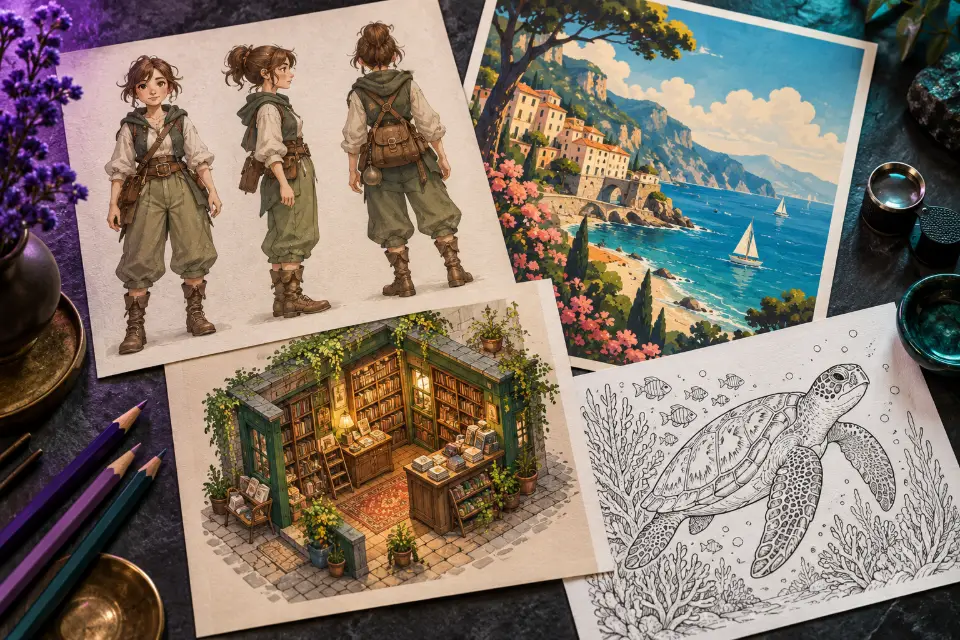
Good Midjourney prompts read like a short description of a finished picture: what is in it, where it is, how the light falls and what it is made with, while technical settings such as the aspect ratio move into parameters at the end. The 14 prompts below follow that pattern for the jobs people actually open Midjourney for – character sheets, logo marks, interiors, coloring pages, posters and phone wallpapers.
They are written for Midjourney V8.1, the current version since 30 April 2026, and the cheat sheet after the prompts explains the parameters you will reach for most. Parameters can change between versions, so check docs.midjourney.com when something behaves differently than described here.
The short answer
Copy a prompt, replace the words in square brackets and paste it into the prompt box on midjourney.com. Then add parameters from the cheat sheet, such as --ar 4:5 for a portrait format, or pick Midjourney in Prompt Studio, which adds the format and the avoid list for you.
Midjourney prompt guide: describe the picture, don’t ask for it
Midjourney does not follow instructions the way a chatbot does. It reads your prompt as a description and builds an image that matches it, so “please create a picture of a cozy café for me” works no better than “corner café, rainy evening, warm lamps, watercolor”. Drop the polite framing and describe what should be visible.
Concrete nouns beat vague adjectives. “Beautiful” and “epic” leave every decision to the model, while “weathered oak table” or “low winter sun” give it something to draw. Every extra word competes for attention, so cut anything that is not visible in the picture. Long chains of quality tags such as “8k, masterpiece, trending” mostly add noise.
Midjourney prompt structure in six parts
You do not need a fixed template, but this order keeps prompts readable and lets you change one piece at a time. Parameters always go at the very end, never in the middle of the description.
- Subject and action: who or what, doing what (“a hedgehog postman sorting letters”).
- Setting: place, time of day and season.
- Medium: photograph, watercolor, ink line art, 3D clay render, screen print.
- Light: “soft overcast light”, “hard noon sun”, “neon glow from the left”.
- Color and mood: a short palette or a feeling (“muted sage and cream, calm”).
- Composition: close-up, wide shot, top-down, or centered with empty space above.
How do negative prompts work in Midjourney?
Writing “no people” or “without text” inside the prompt often backfires. Midjourney sees the words “people” and “text” and may add exactly that. Exclusions belong in the --no parameter instead, for example --no text, letters, watermark, placed after the description.
Keep that list short and limited to things that keep showing up uninvited; a long list of everything you can think of tends to flatten the image. Several prompts below come with a short avoid list for exactly this purpose.
14 prompts to copy and adapt
Character design sheet with three views
Character design sheet of a young [profession] explorer in a patched canvas jacket, leather satchel and brass goggles, shown in front view, side view and back view standing in a row, same outfit and proportions in every view, clean concept art with soft cel shading, plain warm gray background, small color swatches along the bottomAsking for “the same outfit and proportions in every view” keeps the three figures consistent. Swap the profession and two clothing details.
Minimal logo mark without letters
Minimal flat vector logo mark of a fox head built from a few clean geometric shapes, single solid [color] on a white background, bold negative space, balanced and centered, readable at small sizes, simple enough to print on a rubber stampAvoid: text, letters, gradient, photo, 3D
Midjourney still misspells words, so this asks for the symbol only. Add your business name later in a design tool, or try Ideogram for generated lettering.
Realistic street portrait on 35mm film
Candid street portrait of a [age]-year-old flower seller arranging tulips at a market stall early in the morning, soft overcast light, 35mm film photograph, natural skin texture, slightly faded colors, shallow depth of field with the busy street blurred behindFor realistic photos, add --style raw: Midjourney then drops its polished default look. Change the job and the market to build a series in one style.
Interior design concept for a small apartment
Interior design photo of a small city apartment living room in warm mid-century style, walnut sideboard, mustard wool armchair, terracotta floor tiles, a tall fiddle-leaf plant by a big window, late afternoon sun across the floor, shot from the doorway at eye level, wide lens, calm and lived-in“Shot from the doorway” gives a realistic viewpoint instead of a floating 3D render. Swap the style name and three key pieces to compare concepts for the same room.
Architecture concept in a pine forest
Architectural visualization of a low concrete and glass public library set into a pine forest slope, long cantilevered reading room, warm interior light glowing at dusk, a few people reading inside, mist between the trees, wide eye-level view, photorealistic render, quiet and modernPeople inside give scale, and dusk light makes the glass readable. Swap the material and the landscape, for example timber on a lakeshore.
Picture-book illustration in watercolor
Children’s picture-book illustration of a hedgehog postman delivering letters through a small autumn village, round doors and windows, falling orange leaves, loose watercolor washes with fine ink outlines, soft paper texture, warm and gentle, empty pale sky in the upper third of the pageThe empty sky leaves room for the words of a real book page. Keep the medium words and swap the animal and the season to build matching spreads.
Coloring book page for kids
Coloring book page of a friendly sea turtle swimming through a coral reef with small fish and seaweed, thick clean black outlines on pure white, flat line art, large open areas that are easy to color, simple rounded shapes for young childrenAvoid: shading, gray tones, color, text
The avoid list keeps the page free of gray fill that would print badly. For older kids, ask for “detailed patterns in the shell” instead of simple shapes.
Dark and moody food photo
Dark and moody food photograph of a rustic sourdough loaf with one slice cut, butter melting on a small knife, scattered flour and crumbs on a charred wooden board, single window light from the left, deep shadows, rich brown and cream tones, three-quarter overhead angleOne light source from the side is what creates the moody look. Swap the bread for any homemade dish; keep the board and the window light.
Isometric diorama of a tiny shop
Isometric 3D diorama of a tiny corner bookshop on a floating square of street, stacked books in the window, a cat asleep on the awning, string lights, a bicycle by the door, soft clay render, pastel colors, gentle studio lighting, plain soft blue backgroundIsometric scenes suit app illustrations and game ideas. Swap the shop type and one cute detail; keep “floating square” so the diorama stays self-contained.
Retro travel poster for wall art
Vintage travel poster of a small coastal town with white houses stacked on a cliff, a red sailboat in the bay, bold flat shapes in a screen-print style, limited palette of navy, coral and sand, subtle paper grain, a clean empty band of sky at the top for a title added laterAvoid: text, letters, words
A title band you fill in yourself avoids misspelled lettering. Describe your own town or region; three or four colors keep the print look.
Fashion editorial on a salt flat
High-fashion editorial photograph of a model in a sculptural red wool coat on a white salt flat, the coat hem lifted by strong wind, low late-afternoon sun, one long shadow, vast empty horizon, wide shot with the figure small in the frame, medium format look, clean and graphicA small figure makes it feel like a magazine spread, not a catalog shot. Change the coat color, but keep one bold color against an empty background.
Cinematic sci-fi film still
Cinematic film still of a desert caravan resting beside a half-buried crashed starship at golden hour, camels and travelers in long scarves, heat haze, an enormous rusted hull towering over them, anamorphic lens flare, warm dust in the air, extreme wide shotScale comes from small people next to something enormous. Add --chaos 20 if you want more varied compositions in each grid.
Die-cut sticker design
Die-cut sticker of a sleepy round cat curled up on a crescent moon, thick white border around the whole shape, flat vector illustration, soft lavender and butter yellow, simple bold outlines, isolated on a plain light gray backgroundAvoid: background scenery, text, drop shadow
The thick white border is the line a print shop cuts along. Keep the shapes simple so the sticker still reads at two inches.
Phone wallpaper of floating islands
Vertical fantasy landscape of floating grassy islands linked by rope bridges at sunrise, waterfalls spilling into a sea of clouds, a small lantern-lit house on the highest island, soft golden light, painterly digital art, deep perspective looking up from belowWith the main detail high in the frame, the bottom stays clear for app icons. Swap sunrise for night and add “glowing lanterns” for a darker version.
Which Midjourney parameters change the look?
Three parameters decide how much Midjourney adds of its own. --stylize controls its artistic taste: low values stay closer to your words, high values give more polished, opinionated images that may drift from what you asked for. --chaos controls how different the images in one grid are, which helps while you explore and gets in the way once you know what you want.
--style raw tones down Midjourney’s default beautification. Use it for photographs, product shots and anything that should look plain and real; leave it off for fantasy art, where the default look is part of the appeal. Change one parameter at a time, so you can tell which one made the difference.
How to keep one look with --sref and --seed
--sref takes a style reference: add the link to an image you like, and new prompts borrow its colors, textures and mood without copying its content. It is the most dependable way to make a set of illustrations, posters or thumbnails look like they belong together. Only use reference images you made yourself or have the rights to.
--seed fixes the starting noise of a generation. The same prompt with the same seed gives very similar results, so you can change one word and see what it does. It does not lock a face across different prompts; for a series, combine a style reference with a repeated character description.
Midjourney prompt tips: the common mistakes
If a grid keeps missing the point, one of these is usually the reason.
- Asking for exclusions in the text: move “no text” into --no text.
- Stacking styles: “watercolor, 3D render, oil painting” forces a muddy mix, so pick one medium.
- Too many subjects: describe the main one in detail and keep the others vague.
- Expecting exact lettering: short words in quotation marks sometimes work, but check the spelling and add longer text afterwards.
- Judging before setting the format: a portrait squeezed into 16:9 wastes space, so set --ar first.
Midjourney parameters cheat sheet
| Parameter | What it does | Try it when |
|---|---|---|
| --ar 4:5 | Sets the aspect ratio as width:height | You need a portrait, a 9:16 story or a 16:9 banner |
| --no text, people | Removes things you do not want | Something keeps appearing that you did not ask for |
| --stylize | Sets how much of Midjourney’s own taste is added | Lower for literal results, higher for polished art |
| --chaos | Makes the images in one grid more varied | You are exploring ideas and want surprises |
| --style raw | Tones down the default beautified look | Photos, products and plain realism |
| --sref | Borrows the style of a reference image | A series should share one look |
| --seed | Fixes the starting point of a generation | You want to test one word change at a time |
Questions and answers
How long should a Midjourney prompt be?
Most good prompts are one to three lines. Very short prompts lean on Midjourney’s default style, while very long ones dilute the influence of each word. Describe the subject, setting, light and medium, then stop and add parameters.
How do I stop Midjourney from adding text?
Remove any mention of words, signs or labels from the prompt and add --no text, letters, words at the end. If text still appears on objects such as shop fronts, choose a scene without them or retouch the result.
Are Midjourney prompts public?
Unless your plan includes a private mode, assume that the images you make, and the prompts behind them, can be seen by other users in Midjourney’s gallery. Check the current plan details before you prompt anything confidential.
Can I use these Midjourney prompt examples in other generators?
Yes. They are plain English descriptions, so FLUX.2, ChatGPT, Gemini and Ideogram understand them too. Leave out the parameters for those models and write the format as a sentence instead, such as “vertical 9:16 format”.
Which Midjourney version are these prompts for?
They were written for V8.1, the current version since 30 April 2026. They also work in older versions, but parameter ranges and defaults can differ, so check docs.midjourney.com for the version you use.
Is there a free Midjourney prompt generator?
Prompt Studio on this site is free: choose Midjourney, pick a prompt, and it turns the format and the avoid list into parameters. Generating the images still happens in Midjourney and depends on its own plans.